---
title: How to manage user access?
description: "Easily manage user access: create accounts, manage roles and set permissions on Buybox Network."
---
[Skip to content](https://support.buybox.net/en/knowledge-base/comment-administrer-les-accès-utilisateurs-#main-content)
- [English](https://support.buybox.net/en/knowledge-base/comment-administrer-les-acc%C3%A8s-utilisateurs-)
- [Français](https://support.buybox.net/knowledge-base/gestion-acces-utilisateurs)
English
Show submenu for translations
[Customer portal](https://support.buybox.net/tickets-view?hsLang=en)

Open main navigation
Close main navigation
- - [English](https://support.buybox.net/en/knowledge-base/comment-administrer-les-acc%C3%A8s-utilisateurs-)
- [Français](https://support.buybox.net/knowledge-base/gestion-acces-utilisateurs)
English
Show submenu for translations
- [Customer portal](https://support.buybox.net/tickets-view)
How can we help you?
- There are no suggestions because the search field is empty.
1. [Knowledge Base](https://support.buybox.net/en/knowledge-base?hsLang=en)
2. [Buybox Network Brand](https://support.buybox.net/en/knowledge-base/buybox-network-brand?hsLang=en)
3. [Management](https://support.buybox.net/en/knowledge-base/buybox-network-brand?hsLang=en#management)
August 20, 2026
# How to manage user access?
## User management allows you to add new collaborators to the platform and define their access rights according to their role.
Anyone with administrator rights on the Buybox Network platform can create user accounts independently.
To create a new user, follow these steps:
1\. Click on your profile in the top-right corner to open the dropdown menu, then click on **"Accounts"**.
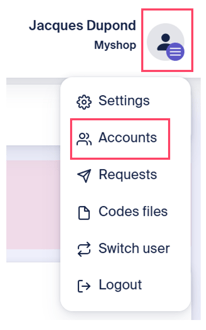
2\. Click on **"Add a new user"**.
3\. Fill in the required information:
- **Reference**: this field is optional. You may associate a reference with a user.
- **Login**: the login must be a valid email address. We recommend using personal email addresses rather than generic ones to ensure action traceability.
- **Role**: choose the role assigned to the user. Depending on the assigned role, the user may have limited visibility and permissions on the platform. Each role is detailed at the end of this article.
- **Status**: when creating a user, the status will be set to **"Active"** by default. If you later wish to deactivate a user, you can change the status to **"Inactive"**.
- **Language**: select the user’s language. Two options are available: French and English.
- The **"First Name"**, **"Last Name"**, and **"Phone Number"** fields are optional.
4\. Then click on **"Create"**.
Once the account has been created, the user will receive an email containing a link valid for 1 hour to enroll their browser and set up a PIN code. Please refer to the article [**"How do I log in to my Buybox Network dashboard"**](https://support.buybox.net/en/knowledge-base/connexion-dashboard-buybox-network?hsLang=en) for the complete platform login procedure.
**📖 Definition of the different roles**
| **Role** | **Permissions** |
| --- | --- |
| Admin | Access to all features, as well as account settings and user management. |
| Distributor Management | Distributor management and access to the “Distributors” tab. |
| Customer Service | Access to after-sales service (Customer Support) features. |
| Accounting | Access to reports and prepaid account monitoring. |
**💡Best practices**
- Create user accounts using individual (named) email addresses whenever possible to ensure full traceability of all actions performed.
- Grant users only the permissions they need to perform their role, helping to reduce the risk of errors.
- Regularly review user access rights and disable any accounts that are no longer in use.
- [Buybox B2C](https://support.buybox.net/en/knowledge-base/buybox-b2c?hsLang=en#main-content)
- [Loyalty campaign](https://support.buybox.net/en/knowledge-base/buybox-b2c?hsLang=en#loyalty-campaign)
- [Buybox Network Brand](https://support.buybox.net/en/knowledge-base/buybox-network-brand?hsLang=en#main-content)
- [Dashboard](https://support.buybox.net/en/knowledge-base/buybox-network-brand?hsLang=en#dashboard)
- [Distributors](https://support.buybox.net/en/knowledge-base/buybox-network-brand?hsLang=en#distributors)
- [Promotions](https://support.buybox.net/en/knowledge-base/buybox-network-brand?hsLang=en#promotions)
- [Management](https://support.buybox.net/en/knowledge-base/buybox-network-brand?hsLang=en#management)
- [Guides](https://support.buybox.net/en/knowledge-base/guides?hsLang=en)
[](https://www.buybox.net/)
[mailto:email@email.com](mailto:email@email.com)
Copyright © 2026, Buybox Oonetic